
Simple ASP.NET Core web app using Dapper and SQLite
Here's a simple ASP.NET Core web app using Dapper to access a SQLite database containing authors, articles and tags associated with the articles. You can download the source from GitHub.
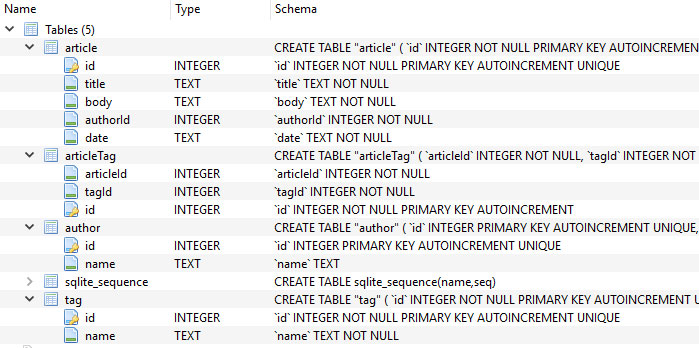
I wanted to figure out how to use Dapper to fetch data in a many-to-many relationship. The tags are stored centrally in the tag table. The many-to-many relationship between tags and articles is managed through the articleTag table which links tag records to article records.
This is the entire SQLite database schema :
Here is how I fetch articles, their authors and the associated tags :
public List<Article> Fetch(int? tagId = null, int? articleId = null)
{
   var articles = new Dictionary<long, Article>();
   var sql = @"select * from article
         left join author on article.authorid = author.id
         left join articleTag on articleTag.articleId = article.id
         left join tag on tag.id = articleTag.tagId";
   dynamic parameters;
   sql += Fetch_ComposeWhereClause(out parameters, tagId, articleId);

   // NOTE: I had to create an <ArticleTag> type here because Dapper seems to look at each joined table in turn and tries to
   // to map it, regardless of whether I only return the columns I want. I do nothing with the articleTag data
   // here as I only need the associated tag data.
   var result = _connection.Query<Article, Author, ArticleTag, Tag, Article>(
      sql,
      (article, author, articleTag, tag) => {
         if(!articles.ContainsKey(article.Id))
         {
            article.Author = author; // Only one author, they'll all be the same one so just reference it the first time.
            if(tag != null && article.Tags == null)
            {
               article.Tags = new List<Tag>();
            }
            articles[article.Id] = article;
         }
         else
         {
            article = articles[article.Id];
         }
         if(tag != null)
         {
            article.Tags.Add(tag);
         }
         return article;
      }, (object)parameters);

   if(articles.Count > 0)
   {
      return articles.Values.ToList();
   }

   return null;
}
The main problem this solves is assigning one or more tag records to a single article record when article and tag data are bundled together in multiple result rows (one for each tag). I solve this by transforming the flat results into a dictionary :
var articles = new Dictionary<long, Article>();This solution makes sense when you look at some example results from the above SQL command :

As you can see there is data duplication in the resultset for each tag associated with the article. This is a trade off. The alternative approach is to execute two SQL commands firstly to retrieve the articles/authors (which have a one-to-one relationship) and secondly to retrieve the tags associated with the articles in the resultset ie; two SQL commands rather than one.
Both approaches are pretty simple to do with Dapper but I chose to use the single SQL command. But this could be the wrong approach in this instance because the potentially hefty article content is duplicated for each tag. So if an article has a 5k body and has 10 tags associated with it then the data over the network will be at least 50k. Ouch!
If this was a real app I'd monitor its performance and decide which is the better option. It depends where the concerns are; with network bandwidth or with the number of concurrent database connections.
Also if you're interested in ArticleRepository.cs there is an example using a transaction with SQLite. I use a transaction to ensure that a chain of commands is executed as a unit or not at all.
It's all on GitHub so if you want to see an ASP.NET Core app using Dapper with an SQLite database download the source code from my GitHub page.
Note: I wrote a similar project for PetaPoco a few years ago for which I wrote a blog post.
Simple Blog Engine For ASP.NET Core Developers
I made a file-based, customisable and fast ASP.NET Core blog engine using razor views as the blog posts files. I gave it a beautiful name, Simple blog engine for ASP.NET Core developers and it looks like this out of the box :

You could knock this up yourself in an hour of course but the advantages of using this blog engine are the extra features you get for free :
- Contact page
- Tag system
- Recent posts sidebar
- Open graph meta tags
-
Optional built-in third party support for :
- Disqus comments
- AddThis for sharing blog posts
- Google Analytics
- Google Recaptcha on the contact page
- View hook points for customisation
- Basic theme support
- Non-destructive updates to engine version
- Code syntax highlighting built in
-
And the obvious ASP.NET Core benefits :
- SEO friendly URLs
- Responsive design
- Cross platform deployment
This blog uses it and it's much faster now I've switched from Wordpress.
Interested? How to get started
Grab the repo from my Github account and open it up in Visual Studio or VS Code. It'll run straight out of the box but you'll want to change some settings before you go live. It's a three step process :
Step 1 of 3 : siteSettings.json
Copy \Settings\System\siteSettings.json into \Settings\Custom\siteSettings.json. In the copied file fill in the blanks so it looks something like this :
{
  "SiteSettings": {
    "owner": "Joe Blogs",
    "description": "Joe Blogs from Manchester UK talks about .NET, ASP.NET and whatever else tickles his fancy.",
    "siteName": "joeblogs.org",
    "siteURL": "www.joeblogs.org",
    "theme": {
      "themeName": "default",
      "headerImage": "",
      "shareImage": "{theme}/img/share-image.jpg"
    },
    "debugMode": {
      "showViewHooks": "false"
    },
    "metaData": {
      "locale":  "en_GB",
      "twitterUserName": "joe_blogs",
      "pageTitlePrefix": "",
      "pageTitleSuffix": " - www.joeblogs.org"
    }
  }
}
I'll explain what all the settings mean at the end of this blog post.
Step 2 of 3 : Create a blog post
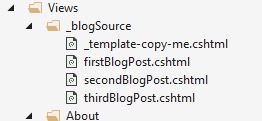
Create a cshtml file in \Views\_blogSource and write your blog post content in HTML. Don't include the blog post title here (see step 3 below).
You can name the cshtml file however you wish and use directories to organise them to your liking.
Alternatively you can use an online HTML editor to write your post and then paste the HTML into the view. For example : https://html-online.com/editor/.
Any images you need can be added to the wwwroot\img folder. If you do add images make sure to use the bootstrap class img-fluid otherwise they won't resize
and may also exceed the container boundary.
<img class="img-fluid" src="...
You may notice the default views in the view folder, you can delete these if you want (but don't delete _template-copy-me.cshtml it's handy) :
If you're writing about code and want to use the built-in code syntax highlighting then use HTML like this :
<div class="code-container">
  <pre><code class="javascript">{
    var message = "This is my javascript";
  }</code></pre>
</div>
See the highlight.js docs for different code clases eg; html, csharp etc...
Step 3 of 3 : Tell the engine about your blog post
Once you've written your blog post you need to tell the engine about it. We just edit a settings file for that.
Copy \Settings\System\blogPosts.json into \Settings\Custom\blogPosts.json and edit the file.
You'll notice a "blogs" array in the JSON. Each object in the array represents a blog post.
The array initially contains the default blog posts that demonstrate the engine. Delete those, leaving just an empty blogs array like this :
{
  "blogsPerPage":3,
  "NumberOfRecentBlogPostsToShowInSidebar": 5,
  "blogs":[]
}
Now add an object for your new blog post. Make sure that the "view" property is set to the name of the view you created for the blog post. You can add easily tags too :
{
  "blogsPerPage":3,
  "NumberOfRecentBlogPostsToShowInSidebar": 5,
  "blogs":[{
   "published":true,
	"title":"My First Blog Post",
	"description": "This description is displayed on the /blog/all page.",
	"date":{
	  "year":"2017",
	  "month":"11",
	  "day":"4",
	  "display":"Nov 4th, 2017"
	},
	"author":"Your Name",
	"slug":"my-first-blog-post",
	"view":"myFirstBlogPost.cshtml",
	"tags":["test", "blog"]
  }
    /* ,{...} "blogs" is an array. Future blog posts go here too */
  ]
}
In the future I may add an alternative method of adding blog post settings so that it's more manageable when there are lots of posts. For now it's fine.
You're done, that's a basic blog ready for deployment. Just repeat the process for each new blog post. There are lots of extra features though so let's go through them.
Customisation
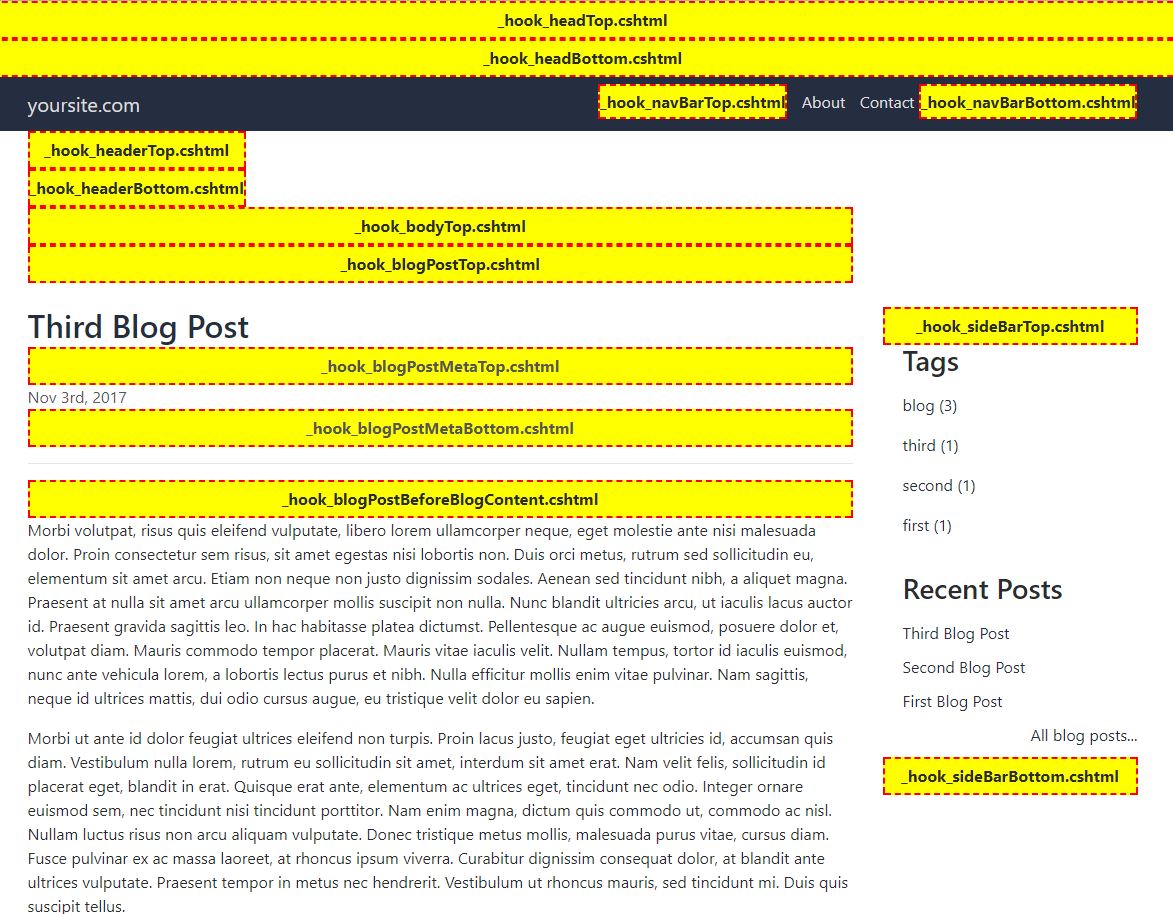
If you look in \Views\Shared\EmptyCustomViews you'll see lots of empty views. These are all the hook points where you can insert your own HTML :

The best way to visualise where these hook points are is to edit \Settings\Custom\siteSettings.json and set debugMode.showViewHooks = "true". This triggers
a box to display where each hook point sits in the layout.

You won't want to keep this debug mode active for very long as it looks like this :
Find the view hook you need and copy it from \Views\Shared\EmptyCustomViews into \Views\Custom. Don't edit anything in \Views\Shared\EmptyCustomViews
otherwise it'll be overwritten when you update the engine. Always copy custom views from \Views\Shared\EmptyCustomViews in this way before you edit them.
Tip: You can do this with any view by the way, not just hook points.
This view overriding behaviour is enabled via a simple view locator in \Utility\CustomViewLocationExpander.cs :
public class CustomViewLocationExpander : IViewLocationExpander
{
  public IEnumerable ExpandViewLocations(ViewLocationExpanderContext context, IEnumerable viewLocations)
  {
    // {1} is the controller and {0} is the name of the View
    var newViewLocations = new List(viewLocations);
    newViewLocations.Insert(0, "/Views/Shared/EmptyCustomViews/{0}.cshtml"); // First. for a moment.
    newViewLocations.Insert(0, "/Views/Custom/{0}.cshtml"); // Not any more, this is first now.
    return newViewLocations;
  }
}
A good example of using a hook point is to add a mailing list signup form to your sidebar and at the bottom of blog posts. In this blog I used _hook_sideBarTop.cshtml and _hook_blogPostBeforeComments.cshtml to add some HTML from Tiny Letter.

Themes
The current theme is declared in siteSettings.json
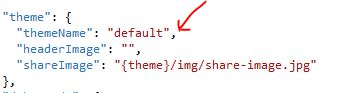
The theme name just maps to \wwwroot\themes\{themeName} so you can add your own resources in an organised folder. You don't have to use a theme, there's nothing stopping
you putting your resources wherever you like, but be aware that if you edit the default theme's files you will lose your changes when you upgrade the engine. Make your own theme.
Settings files
siteSettings.json
- owner
- This is your name. It's used in places such as the footer, the meta tags and the contact page
- description
- A short description of your site for the meta tags
- siteName
- Used in the meta tags and also used as the main home link text on the top left side of the header
- theme.themeName
- This is effectively the folder name in
\wwwroot\themeswhere you put your custom resources - theme.headerImage
- If you want a header image just below the navbar then enter the path here.
- theme.shareImage
- If you want a custom share image enter the path here. So if someone shares your blog posts on Facebook or Twitter etc.. the share image wil be used there.
- debugMode.showViewHooks
- If this is "true" then the blog will show you all the hook points you can use.
- metaData.locale
- Used in the site meta data
- metaData.twitterUserName
- Enter your Twitter user name for the twitter link in the footer.
- metaData.pageTitleSuffix
- This is important too, it appears in the meta tags such as page title. It's going to help your SEO.
addThisSettings.json
AddThis integration is built-in so you don't have to use view hooks. Just create your share panel on www.addthis.com and get your AddThis ID, which is the value that starts with "ra-" eg; "ra-123213213frf341f"
- isEnabled
- Need to be "true" for the built-in AddThis integration to work
- addThisID
- Grab this from your AddThis backend
If you prefer to paste the AddThis code yourself then ignore addThisSettings.json and use the _hook_blogPostBeforeShareButtons.cshtml hook.
blogPosts.json
This is how the blog engine knows about your blog posts.
- blogsPerPage
- The home page is a paginated list of all your blogs. How many blog posts do you want per page?
- NumberOfRecentBlogPostsToShowInSidebar
- In the sidebar there is a list of links to your most recent blog posts. How many do you want to display?
- blogs[n].published
- Set to "false" to remove all links to this blog post off your site
- blogs[n].title
- The blog post's title
- blogs[n].description
- The blog post description appears on the \blog\all page, which is linked to from the Recent Posts sidebar. Just copy the first sentence or two from your blog post.
- blogs[n].date.year
- The year of the blog post. Used for sorting
- blogs[n].date.month
- The month of the blog post. Used for sorting
- blogs[n].date.day
- The day of month of the blog post. Used for sorting
- blogs[n].date.display
- This is how the blog post's date is displayed to the reader
- blogs[n].author
- The blog posts's author which appears under the title
- blogs[n].slug
- This is how the blog post appears in the URL. Don't change this after you've published it unless you don't mind resetting this blog post's SEO
- blogs[n].view
- This is path to your blog post's cshtml file you put in
\Views\_blogSource. You can create folders here, just include them in the path here eg; "2017\blogPost.cshtml" - blogs[n].tags
- An array of string represeting this blog posts's tags
disqusSettings.json
Disqus integration is built-in so you don't have to use view hooks. Just create a profile for your site on www.disqus.com and copy the short name here.
- isEnabled
- Needs to be "true" for the built-in AddThis integration to work
- shortName
- Grab this from your disqus backend
emailSettings.json
For the contact page to work you'll need to enter your email settings here. It's easiest to show you a working example for Gmail :
{
  "EmailSettings": {
    "PrimaryDomain": "smtp.gmail.com",
    "PrimaryPort": "587",
    "SecondayDomain": "smtp.live.com",
    "SecondaryPort": "587",
    "UsernameEmail": "{your gmail email address goes here}",
    "UsernamePassword": "{your gmail password goes here}",
    "FromEmail": "{the email address of who you want the email to appear to be from}",
    "ToEmail": "{the email address that should receive the contact message}",
    "CcEmail": "",
	 "Subject":  "Contact from garethelms.org"
  }
}
googleAnalyticsSettings.json
Google Analytics integration is built-in so you don't have to use view hooks. Just create a profile for your site on analytics.google.com and copy the profile ID here.
- isEnabled
- Needs to be "true" for the built-in Google Analytics integration to work
- trackingID
- Grab this from your Google Analytics backend eg; UA-123456
googleRecaptchaSettings.json
Google Recaptcha integration is built in to the contact page to prevent spam. Just create a profile for your site on www.google.com/recaptcha/intro/ and copy the keys here.
- isEnabled
- Needs to be "true" for the built-in Google Recaptcha integration to work
- siteKey
- Grab this from your Google Recaptcha backend eg; 1234j2th54th34t54ji5rtGF
- secretKey
- Grab this from your Google Recaptcha backend eg; 1234j2th54th34t54ji5rtGF
hosting.json
This is your standard ASP.NET Core hosting.json file. This is useful if you're deploying through a proxy server such as Apache on Ubuntu. Apache needs to know where your web site's service sits.
Using the settings in your views
The settings files are parsed into POCO objects. If you want to use the settings in your own views you can inject them like this :
@inject Microsoft.Extensions.Options.IOptionsMonitor addThisConfigMonitor
@inject Microsoft.Extensions.Options.IOptionsMonitor<BlogPostsSettings> blogPostConfigMonitor
@inject Microsoft.Extensions.Options.IOptionsMonitor<DisqusSettings> disqusConfigMonitor
@inject Microsoft.Extensions.Options.IOptionsMonitor<EmailSettings> emailConfigMonitor
@inject Microsoft.Extensions.Options.IOptionsMonitor<GoogleAnalyticsSettings> googleAnalyticsSettings
@inject Microsoft.Extensions.Options.IOptionsMonitor<GoogleRecaptchaSettings> googleRecatchaSettings
@inject Microsoft.Extensions.Options.IOptionsMonitor<SiteSettings> siteSettings
Just inject the settings you need. Then to access the settings using do something like siteSettings.CurrentValue.
Startup.cs
Some magic happens in Startup.cs.
The array of blog post configuration objects from blogPosts.settings are ordered by date and any unpublished blogs removed. The tags are also loaded into an array along with each tag's blog count.
Because the settings files are monitored for changes they are automatically mapped into POCOs when you edit them and there's no need to restart your web server. The settings files are only parsed at startup and when they are changed. The resulting POCOs are always in memory ready for action.
What's next
It depends if people are interested but a vague list of possible future changes are :
- Plugins
- Markdown support
- Admin login for easier editing of settings and blog posts
- Resource bundling
- Change where blog post settings are stored
Any problems or questions just ask.
Help with Spritekit position and anchorPoint
Spritekit nodes have position and anchorPoint CGPoint properties. I found the behaviour of these two properties confusing at first. Especially when adding multiple levels of children using SKNode’s addChild method. So here is a “cheat sheet” if you like, a visual helper that explains how it all works. If you’re as confused as I was then studying these examples should help.
You can download the code from my GitHub page.
One thing before you get started; in the examples below you’ll see functions like makeRedBox. These are just helpers to keep the code examples simple :
		-(SKSpriteNode *)makeRedBox:(CGSize)size {
return [[SKSpriteNode alloc] initWithColor:[UIColor redColor] size:size];
}
-(SKSpriteNode *)makeGreenBox:(CGSize)size {
return [[SKSpriteNode alloc] initWithColor:[UIColor greenColor] size:size];
}
-(SKSpriteNode *)makeBlueBox:(CGSize)size {
return [[SKSpriteNode alloc] initWithColor:[UIColor blueColor] size:size];
}
Test 1
			SKSpriteNode *box1 = [self makeRedBox:CGSizeMake(100, 100)];
box1.anchorPoint = CGPointMake(0,0);
box1.position = CGPointMake(100,100);

SKSpriteNode *box2 = [self makeBlueBox:CGSizeMake(50, 50)];
box2.anchorPoint = CGPointMake(0,0);
box2.position = CGPointMake(0,0);
[box1 addChild:box2];

SKSpriteNode *box3 = [self makeGreenBox:CGSizeMake(25, 25)];
box3.anchorPoint = CGPointMake(0,0);
box3.position = CGPointMake(0,0);
[box2 addChild:box3];

[self addChild:box1];

- Red’s size is 100 x 100 which makes it easy to understand its children positioning
- Blue is 50 x 50 and green is 25 x 25.
- Red’s anchor is 0,0 which means that the bottom left pixel is at position 100,100 on the screen.
- All children are also at 0,0 (relative to the parent’s position).
Test 2
SKSpriteNode *box1 = [self makeRedBox:CGSizeMake(100, 100)];
box1.anchorPoint = CGPointMake(0.5,0.5);
box1.position = CGPointMake(100,100);

SKSpriteNode *box2 = [self makeBlueBox:CGSizeMake(50, 50)];
box2.anchorPoint = CGPointMake(0,0);
box2.position = CGPointMake(0,0);
[box1 addChild:box2];

SKSpriteNode *box3 = [self makeGreenBox:CGSizeMake(25, 25)];
box3.anchorPoint = CGPointMake(0,0);
box3.position = CGPointMake(0,0);
[box2 addChild:box3];

[self addChild:box1];

- All that’s changed is red’s anchor is now 0.5,0.5 which represents the exact centre. Anchors go from 0,0 (bottom left to 1,1 (top right).
- Red’s position is still 100,100.
- Blue and green are still in the exact same place as test 1.
- Only red has moved, the anchor point change means that now the centre of red is at position 100,100 instead of the bottom left pixel.
Test 3
SKSpriteNode *box1 = [self makeRedBox:CGSizeMake(100, 100)];
box1.anchorPoint = CGPointMake(0.5,0.5);
box1.position = CGPointMake(100,100);

SKSpriteNode *box2 = [self makeBlueBox:CGSizeMake(50, 50)];
box2.anchorPoint = CGPointMake(0,0);
box2.position = CGPointMake(25,25);
[box1 addChild:box2];

SKSpriteNode *box3 = [self makeGreenBox:CGSizeMake(25, 25)];
box3.anchorPoint = CGPointMake(0,0);
box3.position = CGPointMake(0,0);
[box2 addChild:box3];

[self addChild:box1];

- Remember that red’s centre is the new anchor point for it’s children.
- All I’ve done is I’ve move the position of blue to 25,25 (a quarter of red’s width/height).
- So blue has moved diagonally upwards away from the centre.
- Remember that positive Y changes go upwards in Spritekit.
Test 4
SKSpriteNode *box1 = [self makeRedBox:CGSizeMake(100, 100)];
box1.anchorPoint = CGPointMake(0.5,0.5);
box1.position = CGPointMake(100,100);

SKSpriteNode *box2 = [self makeBlueBox:CGSizeMake(50, 50)];
box2.anchorPoint = CGPointMake(0.5,0.5);
box2.position = CGPointMake(25,25);
[box1 addChild:box2];

SKSpriteNode *box3 = [self makeGreenBox:CGSizeMake(25, 25)];
box3.anchorPoint = CGPointMake(0,0);
box3.position = CGPointMake(0,0);
[box2 addChild:box3];

[self addChild:box1];

- So blue’s position is still the same but it’s moved back down. How has this happened?
- Blue’s anchor point has changed to 0.5,0.5 which means that the centre of blue is now at the position 25,25 instead of the bottom left 0,0.
- Green is in the same position, still relative to the blue’s position (which hasn’t changed).
Test 5
SKSpriteNode *box1 = [self makeRedBox:CGSizeMake(100, 100)];
box1.anchorPoint = CGPointMake(0.5,0.5);
box1.position = CGPointMake(100,100);

SKSpriteNode *box2 = [self makeBlueBox:CGSizeMake(50, 50)];
box2.anchorPoint = CGPointMake(0.5,0.5);
box2.position = CGPointMake(25,25);
[box1 addChild:box2];

SKSpriteNode *box3 = [self makeGreenBox:CGSizeMake(25, 25)];
box3.anchorPoint = CGPointMake(0.5,0.5);
box3.position = CGPointMake(0,0);
[box2 addChild:box3];

[self addChild:box1];
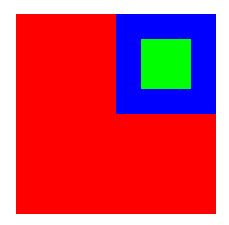
- Green still has the exact same position.
- But the anchor point is now its centre, so the centre of green now sits at it’s position.
- The position of a node is always centred on the anchor position of a node.
- A node’s default anchor is 0,0 so the bottom left will always be at its position unless you change the anchor.
Test 6
SKSpriteNode *box1 = [self makeRedBox:CGSizeMake(100, 100)];
box1.anchorPoint = CGPointMake(0.5,0.5);
box1.position = CGPointMake(100,100);

SKSpriteNode *box2 = [self makeBlueBox:CGSizeMake(50, 50)];
box2.anchorPoint = CGPointMake(0.5,0.5);
box2.position = CGPointMake(25,25);
[box1 addChild:box2];

SKSpriteNode *box3 = [self makeGreenBox:CGSizeMake(25, 25)];
box3.anchorPoint = CGPointMake(0.5,0.5);
box3.position = CGPointMake(0,-50);
[box2 addChild:box3];

[self addChild:box1];

- Aaargh what’s going on!?
- Green’s position has been moved down 50 points (half the square in this example)
- Green’s position is relative to blue’s position.
- Blue’s anchor position (centre) disguises the fact that blue’s position is really it’s centre.
- 50 points down from blue’s centre is the centre of green.
- But why the centre of the green? It’s because green’s anchor point is 0.5,0.5.
- Anchor’s mean that what you are looking at doesn’t always make sense if you only think about positions.
- I’d love to see a debug option in Spritekit that shows node positions as little crosses.
Test 7
SKSpriteNode *box1 = [self makeRedBox:CGSizeMake(100, 100)];
box1.anchorPoint = CGPointMake(0.5,0.5);
box1.position = CGPointMake(100,100);

SKSpriteNode *box2 = [self makeBlueBox:CGSizeMake(50, 50)];
box2.anchorPoint = CGPointMake(0.5,0.5);
box2.position = CGPointMake(25,25);
[box1 addChild:box2];

SKSpriteNode *box3 = [self makeGreenBox:CGSizeMake(25, 25)];
box3.anchorPoint = CGPointMake(0,0);
box3.position = CGPointMake(0,-50);
[box2 addChild:box3];

[self addChild:box1];

- Finally I just set the green anchor to 0,0 to make test 6 a bit clearer.
- Remember that an anchor of 0,0 means that the node’s bottom left pixel is over the node’s position.
- Green is relative to the anchor point of blue.
- Blue’s anchor point is it’s centre (0.5, 0.5).
- The centre of blue -50 points is right there are the bottom left of green.
Test 8
SKSpriteNode *box1 = [self makeRedBox:CGSizeMake(100, 100)];
box1.anchorPoint = CGPointMake(0.5,0.5);
box1.position = CGPointMake(100,100);

SKSpriteNode *box2 = [self makeBlueBox:CGSizeMake(50, 50)];
box2.anchorPoint = CGPointMake(0.5,0.5);
box2.position = CGPointMake(25,25);
[box1 addChild:box2];

SKSpriteNode *box3 = [self makeGreenBox:CGSizeMake(25, 25)];
box3.anchorPoint = CGPointMake(0,0);
box3.position = CGPointMake(0,-50);
box3.zRotation = 0.7871; // About 90 degrees
[box2 addChild:box3];

[self addChild:box1];

- All I’ve done is rotate green by 90 degrees.
- Greens anchor is 0,0 ie; the bottom left.
- The anchor point is the centre for rotations, you can see that the bottom left of green is still at the same position.
- Green has been rotated from the bottom left by 90 degrees.
Test 9
SKSpriteNode *box1 = [self makeRedBox:CGSizeMake(100, 100)];
box1.anchorPoint = CGPointMake(0.5,0.5);
box1.position = CGPointMake(100,100);

SKSpriteNode *box2 = [self makeBlueBox:CGSizeMake(50, 50)];
box2.anchorPoint = CGPointMake(0.5,0.5);
box2.position = CGPointMake(25,25);
[box1 addChild:box2];

SKSpriteNode *box3 = [self makeGreenBox:CGSizeMake(25, 25)];
box3.anchorPoint = CGPointMake(0.5,0.5);
box3.position = CGPointMake(0,-50);
box3.zRotation = 0.7871; // About 90 degrees
[box2 addChild:box3];

[self addChild:box1];

- This is the same as test 6 but with a 90 degrees rotation on green.
- In test 6 green’s anchor is 0.5, 0.5.
- This means that green is rotated 90 degrees from its centre.
Test 10
SKSpriteNode *box1 = [self makeRedBox:CGSizeMake(100, 100)];
box1.anchorPoint = CGPointMake(0.5,0.5);
box1.position = CGPointMake(100,100);

SKSpriteNode *box2 = [self makeBlueBox:CGSizeMake(50, 50)];
box2.anchorPoint = CGPointMake(0.5,0.5);
box2.position = CGPointMake(25,25);
box2.zRotation = 0.7871; // About 90 degrees
[box1 addChild:box2];

SKSpriteNode *box3 = [self makeGreenBox:CGSizeMake(25, 25)];
box3.anchorPoint = CGPointMake(0.5,0.5);
box3.position = CGPointMake(0,-50);
box3.zRotation = 0.7871; // About 90 degrees
[box2 addChild:box3];

[self addChild:box1];
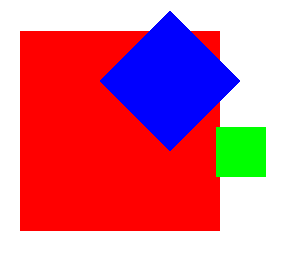
- This is the same as test 9, but I thought “What happens if I rotate blue by 90 degrees too?”
- Blue is rotated from its centre because its anchor point is 0.5, 0.5.
- Because green is a child of blue it gets rotated 90 degrees around from blue’s centre.